
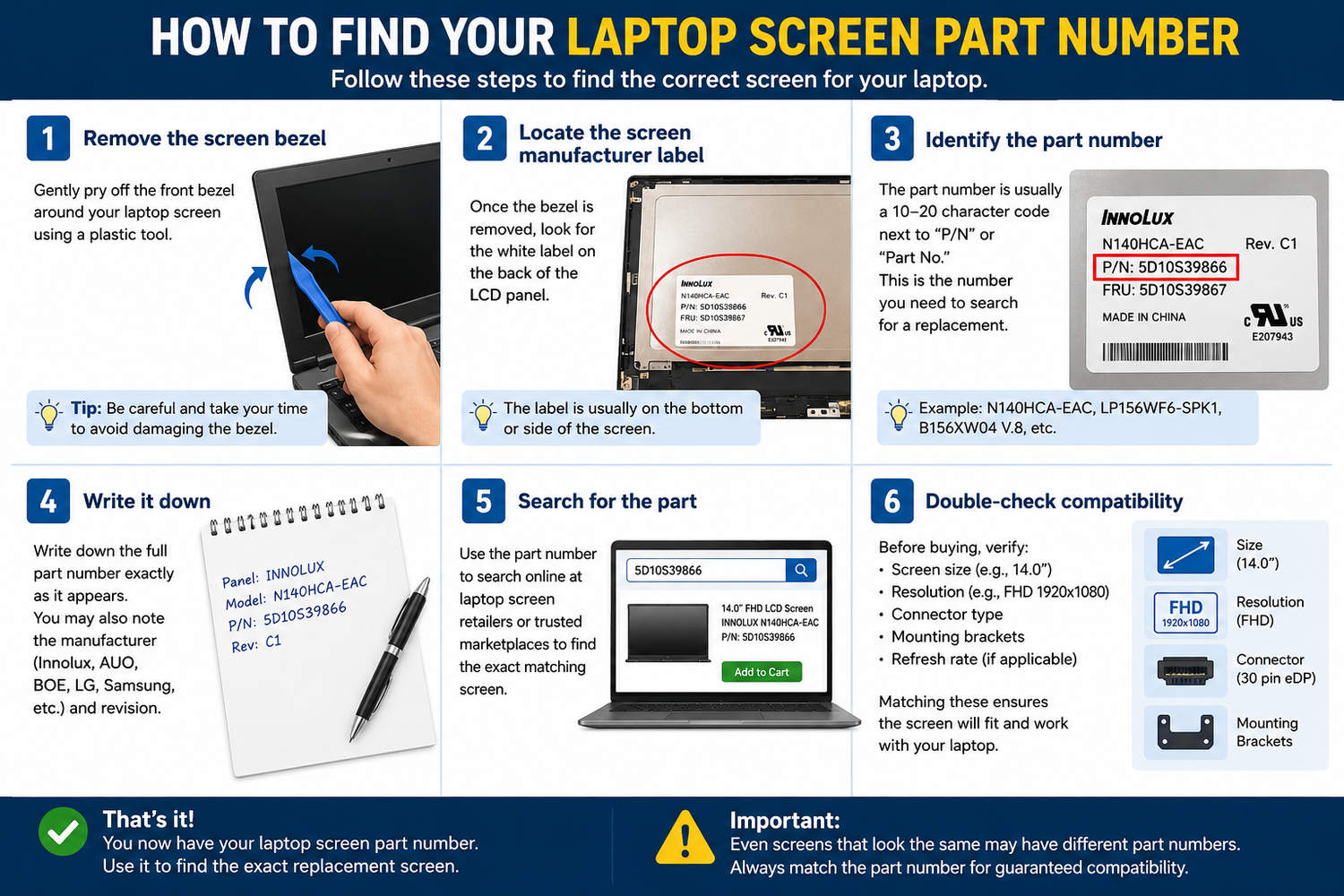
How to Find Your Laptop Screen Part Number
One of the most common questions we get asked at TechnologyVS is: "How do I know which replacement screen to order?" The answer is simple — you need your screen's part number.
Method 1 — Check the Sticker on the Back of Your Screen
- Power off your laptop completely and unplug it
- Remove the rubber screw covers around the screen bezel
- Unscrew and remove the bezel
- Tilt the screen panel forward slightly
- Look for a white sticker on the back of the panel — this contains the part number
The part number will look something like: B156HAN02.0, NE170QDM-NZ1, LP156WFC-SPD1, or N156HRA-EA1
Method 2 — Use Your Laptop Model Number
- Find your laptop model number on a sticker on the bottom of the laptop
- Search online for "[your laptop model] screen part number"
Method 3 — Check Windows Device Manager
- Right-click the Start button and select Device Manager
- Expand the "Monitors" section
- The monitor name shown may indicate the panel being used
Still Not Sure? Contact Us
At TechnologyVS, we're happy to help you identify the correct screen before you order. Browse our full range at technologyvs.co.uk





Leave a comment
This site is protected by hCaptcha and the hCaptcha Privacy Policy and Terms of Service apply.