
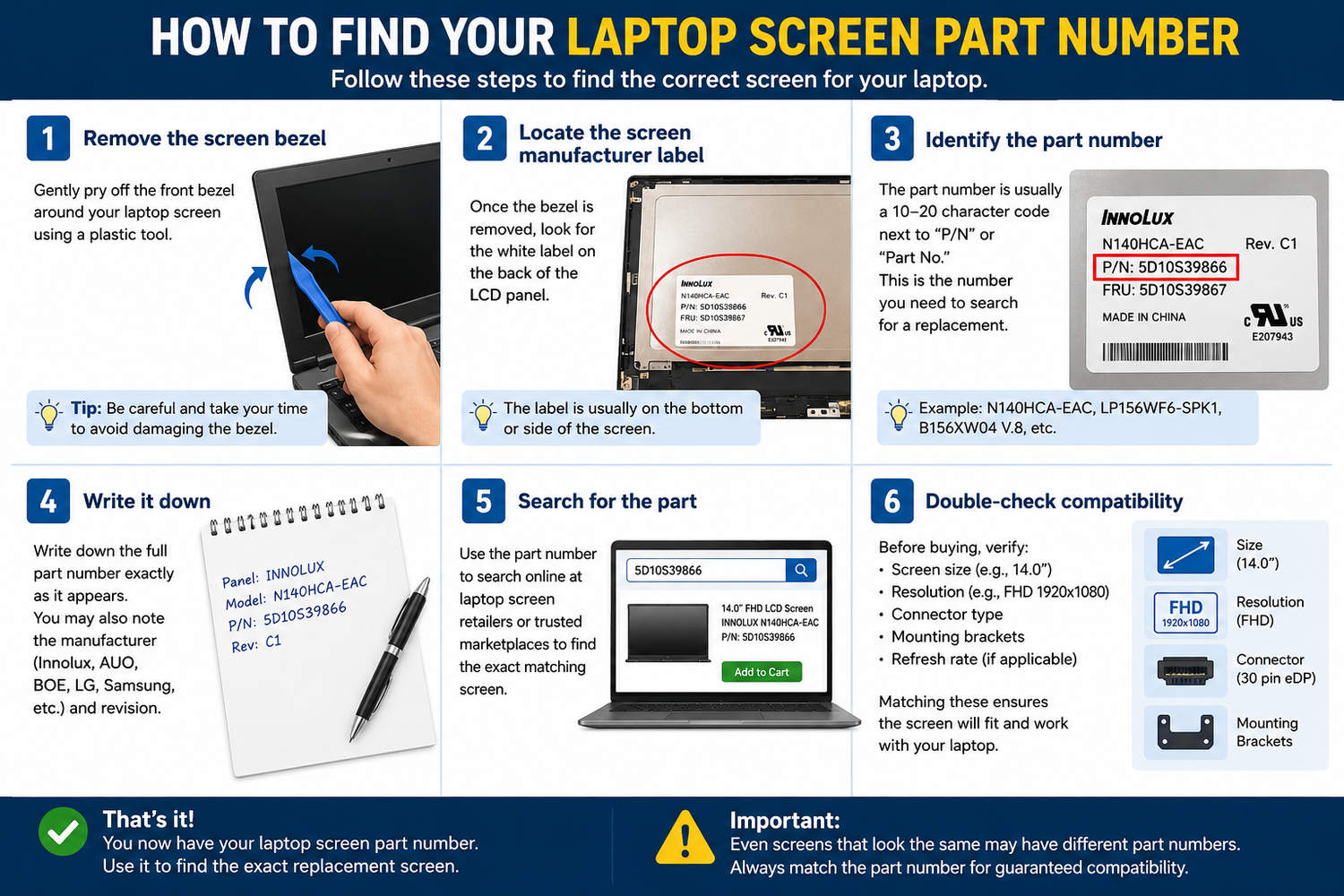
Comment trouver le numéro de référence de l'écran de votre ordinateur portable
L'une des questions les plus fréquentes que nous recevons chez TechnologyVS est : « Comment savoir quel écran de remplacement commander ? » La réponse est simple : vous avez besoin du numéro de référence de votre écran.
Méthode 1 — Vérifiez l'étiquette au dos de votre écran
- Éteignez complètement votre ordinateur portable et débranchez-le
- Retirez les caches-vis en caoutchouc autour du cadre de l'écran
- Dévissez et retirez le cadre
- Inclinez légèrement le panneau d'écran vers l'avant
- Recherchez une étiquette blanche au dos du panneau ; elle contient le numéro de référence
Le numéro de référence ressemblera à ceci : B156HAN02.0, NE170QDM-NZ1, LP156WFC-SPD1 ou N156HRA-EA1
Méthode 2 — Utilisez le numéro de modèle de votre ordinateur portable
- Trouvez le numéro de modèle de votre ordinateur portable sur une étiquette située sous l'appareil
- Recherchez en ligne « [votre modèle d'ordinateur portable] numéro de référence écran »
Méthode 3 — Vérifiez le Gestionnaire de périphériques Windows
- Faites un clic droit sur le bouton Démarrer et sélectionnez Gestionnaire de périphériques
- Développez la section « Moniteurs »
- Le nom du moniteur affiché peut indiquer le panneau utilisé
Vous avez encore un doute ? Contactez-nous
Chez TechnologyVS, nous sommes heureux de vous aider à identifier le bon écran avant que vous ne passiez commande. Parcourez notre gamme complète sur technologyvs.co.uk





Laisser un commentaire
Ce site est protégé par hCaptcha, et la Politique de confidentialité et les Conditions de service de hCaptcha s’appliquent.